What holds a security integrator back
Anyone who installs CCTV, alarms and access control knows the scene. The customer asks for a quote on WhatsApp. The salesperson builds it in a notebook or spreadsheet. The technician installs and sends a photo to a group chat. Material leaves the van without a stock movement. Billing waits. By the time the owner checks, the month is over and nobody knows which service made money.
The problem is not one person. It is a process spread across four or five tools that do not talk to each other. A management system exists to bring that path into one flow:
- Sell: a fast quote with material and labor.
- Execute: a work order with date, owner, photos and signature.
- Control: inventory that does not lie and material linked to each service.
- Get paid: billing, invoice and margin per service.
The 7 controls that cannot live in WhatsApp
If the company still depends on loose conversations, start with these seven points. They are the base of any installation operation.
- Quotes with validity and history. The customer asked on Tuesday and you answered on Friday. Without a pipeline, the request disappears. A quote needs a number, date, items, terms and a place to mark accepted or lost.
- Work order linked to the quote. What was approved must become execution without retyping items, prices and address. Every extra typing is a chance for error.
- Schedule by technician. Knowing who goes where, on which day and at what time avoids calls, rescheduling and waiting customers.
- Record of what happened in the field. Photo, signature, arrival time and material used. This protects the company when the customer complains later.
- Inventory deducted by service. Material that leaves without a stock movement turns inventory into fiction. Buying again what you already have is cash sitting still.
- Billing and reconciliation. PIX and boleto should reconcile automatically. A completed service that is never billed is the most expensive mistake of a company that sells well.
- Invoicing without another system. If the invoice is issued in a separate tool, someone will forget. It should come from the work order itself.
How to choose without buying an oversized ERP
Many companies replace a spreadsheet with an industrial ERP full of modules nobody uses. The result is a high subscription, long training and a team that goes back to WhatsApp. For an installation company, the system must be smaller and more direct.
Use these criteria when comparing options:
- Price per company, not per user. Charging per person discourages giving access to the technician, who is exactly the person with field information.
- Quote and work order in the same flow. If the system does not turn a quote into a work order, you will type everything twice.
- Real mobile use. It is not enough to open on a phone. The technician needs check-in, photo, signature and route in a few taps.
- Inventory linked to the work order. Material should leave stock when it is used, not when someone remembers.
- Finance with margin. Revenue alone does not tell whether the service was worth it. The system must combine material, labor and expenses.
- Invoicing included. A separate issuer means another password, another subscription and another chance to forget.
- Exportable data. The company is yours. If you leave, you take customers, services and history with you.
What Darvigo solves in practice
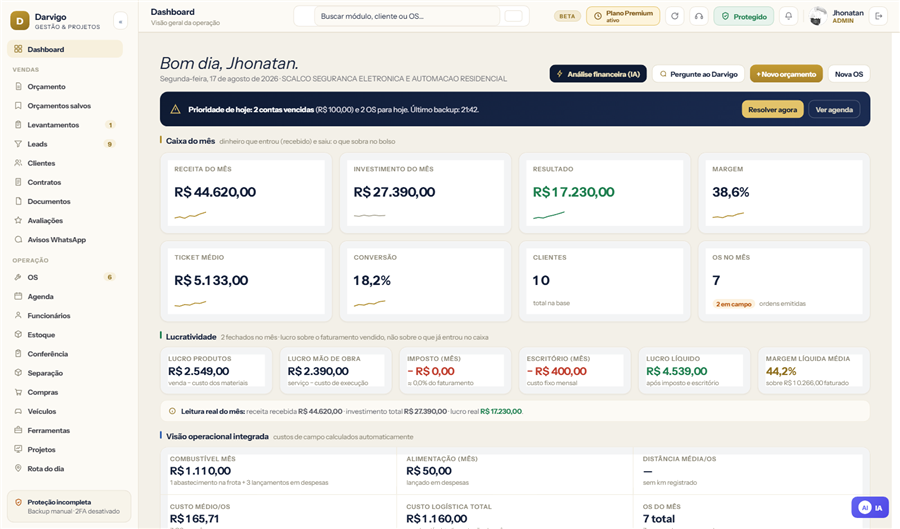
Darvigo was born inside a security integrator and is used there every day. It was built in this order: sell, execute and get paid.
- AI-assisted quotes: describe the service in one sentence and the system assembles items, quantities and labor. Review and send a branded PDF with a PIX QR code.
- An approved quote becomes a work order without retyping.
- The technician receives the work order on the phone, checks in with GPS, takes photos and collects the customer signature.
- Inventory imports the supplier invoice XML and deducts material used in each work order.
- Finance reconciles PIX and boleto, shows overdue receivables and calculates margin per service.
- The invoice comes from the work order, with NF-e and NFS-e in the same plan.
- Technical projects are drawn on the customer floor plan and become a material list, quote and work order.
These are not paid add-ons. They are part of the single plan of BRL 99.90 per month for the whole company.
Price and what is included
Darvigo has one plan, with no better plan to upsell later. The whole company uses it for BRL 99.90 per month or BRL 999 per year, which is equivalent to two months free.
- Up to 10 technicians and 4 office users.
- All modules included, with no per-user fee.
- 7-day free trial without a credit card.
- No lock-in. Cancellation inside the product.
- Brazilian invoicing included, with no separate issuer.
- WhatsApp support to set up the company, the first customer and the first work order.
Common implementation mistakes
The system does not run the company by itself. These mistakes delay the transition:
- Registering everything before using it. Start with the company, three customers, the services you sell most and one real work order. The rest comes as it appears.
- Not giving the technician access. If the field stays on paper, the office never knows what really happened.
- Keeping the parallel spreadsheet. Two sources of truth is the fastest way to distrust the system and go back.
- Not billing completed work. Make it a weekly habit to review completed work orders without a charge.
- Waiting for the month to close to see margin. The system is there to decide today, not to regret on the 30th.
See this running with your own customers
Darvigo is BRL 99.90 per month for the whole company. The 7-day trial does not require a credit card.
Create free accountFrequently asked questions
Do I need a consultant to implement it?
No. Darvigo has an assistant that guides the company, logo, first customer and first work order. If you get stuck, support helps over WhatsApp in Portuguese.
Does it work for a maintenance-only company?
Yes. You register the maintenance service, the contract and recurring billing. The work order records the visit, the technician, photos and what was replaced.
Can I import my customers?
Yes. The Darvigo team helps bring the base you already have in a spreadsheet. Start with active customers and the services you sell most.
Does it work without internet?
Darvigo works connected so the office and technicians see the same information in real time. On the phone, the technician uses the browser without installing a program.
What happens if I cancel?
You export the data and cancel inside the product, with no penalty. The company remains the owner of its information.
What is the difference from a spreadsheet?
A spreadsheet does not warn that a work order was completed and not billed, does not deduct inventory, does not issue invoices and does not show margin per service. The system combines those four things.