Revenue is not profit
A security company can bill BRL 30,000 in a month and end at zero. Revenue shows what was sold. Profit shows what is left after material, labor, travel, taxes and fixed costs.
To know the difference, you need four numbers:
- Revenue: how much was sold and how much was actually received.
- Direct cost: material, labor for the service and travel.
- Fixed costs: rent, salaries, fuel, software, accountant.
- Margin: what is left from the service after direct cost.
The five numbers the owner should review every week
- Completed work orders without a charge. Money already spent that has not come in.
- Overdue receivables. How much is overdue, from whom and for how many days.
- Receipts for the week. What came in by PIX, boleto and cash.
- Service margin. Which services make money and which only create activity.
- Idle inventory. Material bought and not used, which could be in the bank account.
PIX and boleto billing without manual work
Issuing a PIX and waiting for the customer to say they paid is not control. The ideal is for the charge to go out with the right value, due date and customer, and for reconciliation to happen automatically.
With reconciliation, you see on the dashboard what was paid, what is open and what is overdue. The time spent checking receipts goes back into sales and service.
Margin per service: the number that changes decisions
Not every service that fills the schedule is worth it. Installing one camera for a nearby customer can yield more margin than a long job with a lot of material and little finishing. Without the per-service calculation, you decide by volume instead of profit.
To calculate it, add material used, labor, travel and fees. Subtract from the amount charged. The result is the margin of that service. With eight or ten services, a pattern starts to appear: which customers, services and technicians deliver results.
The 15-minute daily finance routine
- Every morning: check what is due today and what is overdue.
- Every end of day: review completed work orders and generate billing.
- Every week: look at receipts, overdue accounts and the margin of the week services.
- Every month: close the cash, review fixed costs and update the price of what you sell.
Fifteen minutes a day avoid a whole Sunday building a spreadsheet.
How Darvigo organizes it
In Darvigo, billing is born from the work order. The system generates PIX and boleto, reconciles receipts, shows what is overdue and calculates margin per service with the material that left inventory. The invoice comes from the same work order, with no separate issuer.
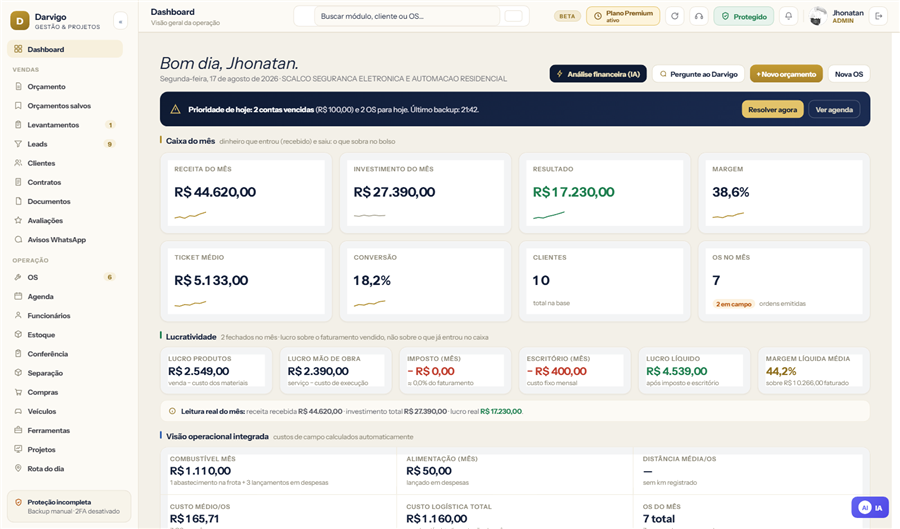
The dashboard shows revenue, margin and work orders for the day. You can also ask the AI questions such as "who owes me?" and "which service made the most profit this month?".
See this running with your own customers
Darvigo is BRL 99.90 per month for the whole company. The 7-day trial does not require a credit card.
Create free accountFrequently asked questions
Does Darvigo replace my accountant?
No. The accountant remains responsible for tax filing. Darvigo organizes operations, billing, invoicing and margin so you can decide with numbers.
Can I charge by PIX and boleto?
Yes. The charge comes from the work order with PIX and boleto, and the system reconciles receipts so you see what was paid and what is open.
Does margin include inventory material?
Yes. When material is deducted in the work order, its cost enters that service calculation. That is why inventory cost must be up to date.
Should I separate company and personal cash?
Yes. Mixing accounts hides the result. The ideal is to have one account or cash box for the company and record owner withdrawals as withdrawals, not expenses.
Does the system show how much each technician produced?
Darvigo shows work orders by technician and what was executed. Commission per person can be configured according to your company rule.
Can it issue service and product invoices?
Yes. NF-e for products and NFS-e for services come from the work order. The company needs a Brazilian A1 digital certificate to sign them.